
library(toolero)
create_qmd(
path = ".",
filename = "analysis.qmd",
yaml_data = "author.yml" # pre-populates author metadata; see note below
)less Maintenance, more Science
Reproducibility by design with toolero
r
reproducibility
coding
Code drift — the quiet divergence between what you report and what you actually ran — is one of reproducibility’s most common and least visible failure modes. This post introduces a workflow built on three toolero functions that address drift structurally: a scaffold that doubles as a maintained source, a context-detection utility that replaces informal path patches, and a post-render hook that derives the submission script automatically.
Abstract
Reproducible research workflows routinely pass through three distinct execution contexts — interactive RStudio sessions, Quarto renders, and standalone Rscript calls for cluster submission — each with its own conventions for working directories and parameter passing. The typical response is informal management: patched paths, commented-out lines, separate entry points. These local fixes are individually reasonable and collectively drift-prone. This post argues for a more principled alternative: treating the Quarto document as a single maintained source from which both the rendered report and the cluster submission script are derived. Three functions from the toolero package support this workflow. create_qmd() scaffolds a project with author metadata, a context-aware input resolution block, and a post-render hook already registered. detect_execution_context() replaces ad hoc branching with an explicit three-way switch that correctly distinguishes interactive, Quarto, and Rscript execution. The post-render hook calls knitr::purl() automatically, so the submission script is emitted as a side effect of rendering rather than maintained separately. Together, these three pieces make divergence structurally difficult rather than merely inadvisable.
Reproducibility is, at its core, a commitment. A commitment to your future self, to those who will need to re-run the analysis six months from now when a reviewer asks a question you did not anticipate. A commitment to collaborators, who should be able to pick up where you left off. A commitment to the scientific record, which is only as trustworthy as the code behind it.
That commitment rests on a quiet assumption: that the code remains stable across time and across contexts. It is worth pausing on that word, contexts, because it is where most reproducibility problems actually enter – not in a single dramatic failure, but incrementally, through a process I have started thinking of as code drift.
1 The Drift Problem
Here is how it usually goes. You write an analysis interactively in RStudio, reading your data from data-raw/penguins.csv. It works. A few weeks later, you fold that analysis into a Quarto document. The path breaks – knitr uses the document directory as the working directory, not the project root – so you patch it. Then you want to run the same logic as a standalone script, maybe to test it before submitting it to a computing cluster. The path breaks again, differently, and you patch it again.
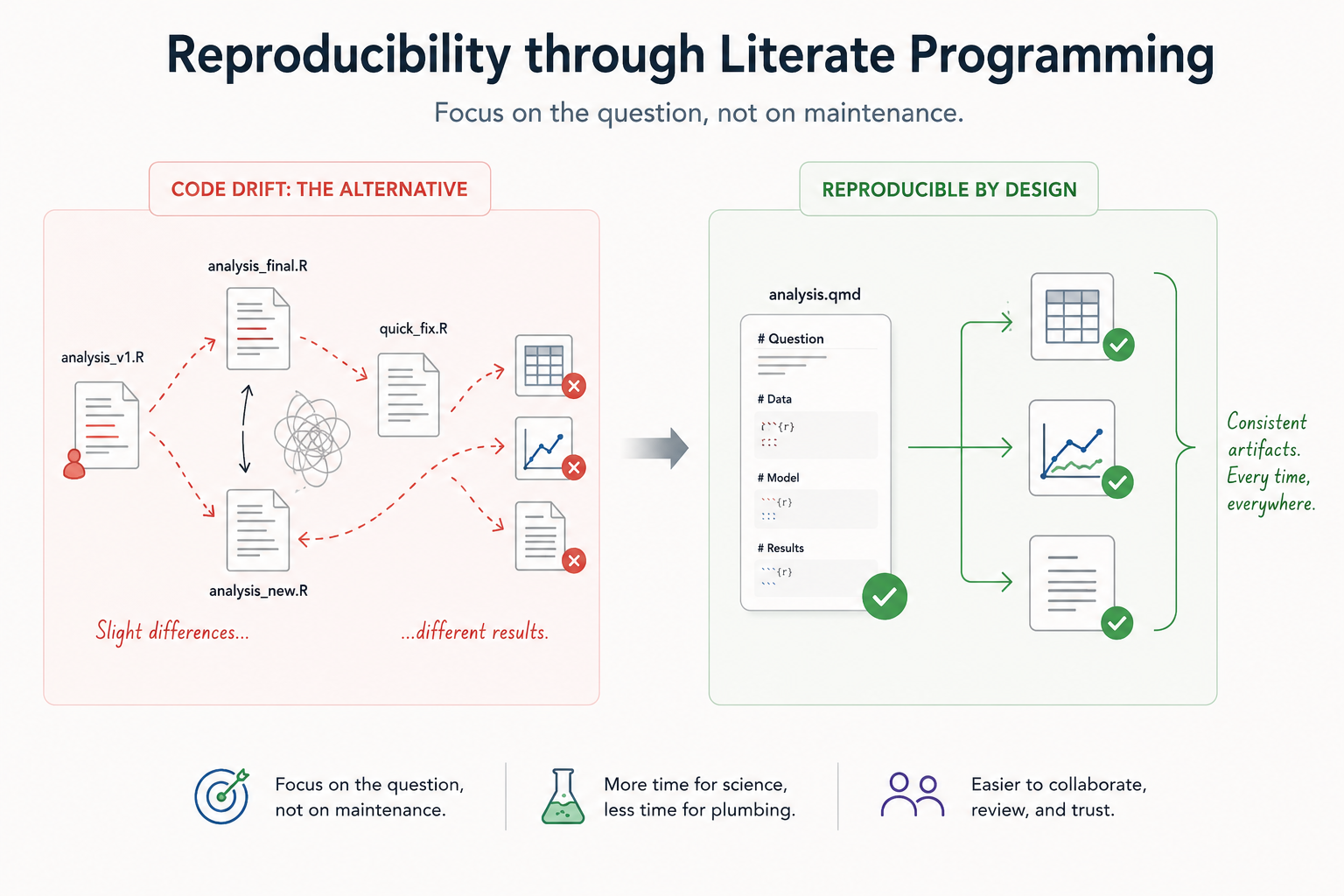
You now have three versions of the same input line:
# Works interactively
data <- read_clean_csv("data-raw/penguins.csv")

# Patched for Quarto
data <- read_clean_csv("../data-raw/penguins.csv")

# Patched again for Rscript / cluster submission
data <- read_clean_csv(commandArgs(trailingOnly = TRUE)[1])
None of these lines is wrong in isolation. The problem is that they now live in different versions of the same analysis. This is code drift. It is not a dramatic failure – no error is thrown, no alarm sounds – it is the slow divergence between what you report and what you actually ran. The danger is that it is invisible until it isn’t.
2 Three Contexts, Three Conventions
To be concrete about what we are dealing with, it helps to name the three contexts a research workflow typically passes through.
Interactive. You are working in RStudio or another IDE. The working directory is set by the .Rproj file, typically the project root. Parameters are set by hand or read from a config file. This is where most analyses are written.
Quarto. Your code lives inside a .qmd document. When quarto render is called, knitr uses the document’s directory as the working directory – which may or may not be the project root, depending on where the document lives. Parameters arrive via the params key in the YAML header.
Rscript / HTCondor. The code runs as a standalone script, dispatched by a job scheduler or launched from the command line. The working directory is wherever the script is called from. Parameters arrive via commandArgs(trailingOnly = TRUE).
None of these contexts share a common convention for how inputs are located or how parameters arrive. The typical response is to manage this informally: separate scripts for each context, lines commented in and out depending on how you plan to run the code, a note to yourself that says “remember to update the path before submitting.” These are reasonable workarounds. They are also precisely where drift lives. Each individual fix feels local and harmless. That is exactly why they accumulate.
3 One Maintained Source, Two Derived Artifacts
There is a more principled alternative, and it starts with a shift in how you think about the Quarto document.
The conventional view is that a .qmd file is a report — a narrative wrapper around the analysis code, useful for communication. The view I want to argue for here is older than Quarto: it is the core claim of literate programming, that code and the reasoning behind it belong together in the same document. What I am adding to that idea is a practical consequence — the .qmd can also serve as a source, the canonical maintained version of the analysis from which everything else is derived.
The rendered HTML or PDF is one derived artifact. The standalone .R script for cluster submission is another. Neither is maintained directly; both are produced from the same source. And because the reasoning lives alongside the code, returning to the analysis — or handing it to someone else — does not require reconstructing decisions that were made under pressure and never written down.
If the report and the script are both derived from the same .qmd, they cannot drift. That is reproducibility by design: divergence is structurally difficult rather than merely inadvisable.
4 Scaffolding the Source with create_qmd()
The first function is create_qmd(). It scaffolds a new Quarto document from a template that is oriented from the start toward portability – toward being a maintained source rather than a one-off report.
A note on yaml_data: the argument accepts a path to a YAML file containing metadata – author name, affiliation, ORCID, email – that gets merged into the document’s YAML header at scaffold time. It is a small quality-of-life detail, but it removes one more reason to postpone setting things up correctly. Your name is already in the document before you write a line of analysis. A minimal author.yml might look like this:
author:
  - name: "Erwin Lares"
    affiliation: "University of Wisconsin-Madison"
    orcid: "0000-0002-3284-828X"
    email: "erwin.lares@wisc.edu"
create_qmd() produces this:
analysis.qmd       # the maintained source document
data-raw/          # sample dataset (Palmer Penguins subset)
assets/            # placeholder logo
_quarto.yml        # project config, registers the post-render hook
R/purl.R           # helper script called by the hook
R/analysis.R       # derived script, produced on first render
The key thing the template encodes – beyond structure and YAML – is a dedicated input resolution chunk that loads toolero and calls detect_execution_context(). It appears in the document before the data-loading section, and it is already wired to params$input_file for the Quarto context. You do not have to add it manually. It is there, waiting for the analysis to be written around it. That design choice is the subject of the next section.
One note: this full setup – the worked example, the sample data, and the context-detection chunk – is what you get with the default include_examples = TRUE. If you call create_qmd() with include_examples = FALSE, you get a minimal skeleton with a setup chunk that loads toolero, but without the input resolution block. For a new analysis intended to run across all three contexts, the default is what you want.
5 Context Awareness at the Point of Input
R code does not know, by default, how it is being run. This sounds like a minor limitation until you try to write code that behaves correctly in all three contexts. The naive solution is if (interactive()) – check whether the session is interactive, branch on that. This almost works, and almost is the problem: interactive() returns FALSE during quarto render, so the check cannot distinguish a Quarto render from an Rscript call. Most people reach for interactive() first. Most people get it wrong.
detect_execution_context() solves this correctly. It returns one of three strings – "interactive", "quarto", or "rscript" – and that single value is enough to drive a switch block that resolves inputs correctly for each context:
context <- detect_execution_context()

input_file <- switch(context,
  interactive = "data-raw/penguins.csv",
  quarto      = params$input_file,
  rscript     = commandArgs(trailingOnly = TRUE)[1]
)

data <- read_clean_csv(input_file)
This replaces the three diverging versions from the opening section with one. The branching is explicit and readable: anyone who opens the file can see immediately that it was written to run in three contexts and understand what each one does. Recall the informal workarounds we named earlier – separate scripts, commented-out lines. This is the structured alternative. The intent is visible in the code rather than in a comment or a memory.
The phrase I keep coming back to is portable in fact rather than just in theory. Context detection is the piece that closes that gap. Without it, extracting the script for cluster use still requires manual adaptation. With it, the extracted script is already correct.
Because create_qmd() includes this block in the template by default, an author using the scaffold does not have to add it. It is there from the first render.
6 Closing the Loop: The Post-Render Hook
The final piece is the mechanism that turns the maintained .qmd into a derived .R script automatically. When create_qmd() scaffolds the project, it writes a _quarto.yml that registers a post-render hook:
project:
  post-render: Rscript R/purl.R
And R/purl.R, which that hook calls, does this:
qmd_files <- fs::dir_ls(getwd(), glob = "*.qmd")

for (input in qmd_files) {
  output <- fs::path("R", fs::path_ext_set(fs::path_file(input), "R"))
  knitr::purl(input, output = output, documentation = 1)
}
It scans the project root for .qmd files and writes a corresponding .R file into R/. So analysis.qmd becomes R/analysis.R. Because the target document is resolved dynamically rather than hardcoded, the same purl.R works regardless of what you named your document.
It is worth being clear that knitr::purl() is not a toolero function – it is from knitr, and it has existed for years. What create_qmd() contributes is that the hook is already registered and the project is already structured so that the extraction makes sense. The author does not have to remember to run purl() after editing the document. Render, and the script appears.
There is a manual counterpart, toolero::qmd_to_r(), for cases where you want to extract a script from an existing document without going through the full render cycle. The hook and qmd_to_r() are doing the same basic thing; the hook just does it automatically.
Because detect_execution_context() is baked into the document from the start, the extracted script inherits context-aware input resolution without any additional work. It is ready to be wrapped by a submission workflow – a HTCondor submit file, a Slurm batch script, whatever the cluster requires – without editing the analysis logic itself. The remaining cluster work is submission mechanics, not debugging code that was written for a different context.
7 From Source to Submission
The full workflow is a short sequence:
- Scaffold with
create_qmd()– author metadata in place, context detection wired, post-render hook registered. - Write the analysis once, inside the
.qmd. - Render – which produces the report and emits the
.Rscript as a side effect. - Submit the script to HTCondor or any other job scheduler, wrapped by the appropriate submission infrastructure.
One maintained source. Two derived artifacts. No manual synchronization. The workflow does not ask you to be disciplined about keeping the report and the script in sync – it removes the step where they would otherwise diverge.
This is also worth saying plainly: this approach earns its keep most at the beginning of a project, before the workarounds accumulate. Retrofitting an existing analysis into this structure is possible, but you are undoing decisions that were made under pressure. The earlier the scaffold is in place, the less there is to undo.
8 What This Does and Does Not Solve
I want to be honest about the limits here.
Context detection handles input resolution. It does not handle the R environment itself. If your interactive session and the cluster node are running different versions of a package – or different versions of R – the analysis may not reproduce even with identical code. That is a container problem, not a context problem. It is the next layer in the stack, and it is what the containr package is designed to address: building and pushing a reproducible execution environment alongside the analysis.
The purl() approach extracts all R code chunks from the document. That means chunk tagging strategy matters. Chunks that exist purely for the rendered report – formatting a display table, generating a figure with custom theming – should be tagged with purl = FALSE to keep the extracted script clean and focused on computation.
Finally, this workflow assumes the document and the submission script are doing the same computational work. If the cluster job is a scaled-up version of a local prototype – more data, more iterations, different resource requirements – some intentional adaptation is still necessary. The goal is to eliminate accidental divergence, not to prohibit deliberate differences. Those are different problems, and conflating them would overclaim what any scaffolding tool can do.
9 Summary
Code drift is a reproducibility problem, and it is a quiet one. It does not announce itself. It accumulates through small, individually reasonable decisions – patched paths, context-specific parameters, separate entry points – until the code you submitted to the cluster is no longer quite the code in your report.
toolero addresses this structurally, through three pieces that work together: create_qmd() scaffolds a document designed to be a maintained source; detect_execution_context() makes input resolution explicit and correct across all three execution contexts; and the post-render knitr::purl() hook derives the cluster script from the document automatically. The result is a workflow where divergence is difficult by design rather than inadvisable by convention.
The functions are small. The commitment they encode is not.
toolero is available on CRAN. Install with install.packages("toolero"). Source and issues: https://github.com/erwinlares/toolero